Develop an efficient bill pay process to make your payments on time, control cash flow, and rely less on manual work.
Staying on top of your bills can be a challenge, but it’s also crucial for maintaining strong relationships with your vendors, controlling cash flow, and peace of mind. Bill pay is the process businesses use to receive, approve, pay, and record the bills they owe to suppliers and vendors.
Here are some concrete steps your business can take to make bill payment more seamless and efficient.
Key takeaways
Bill pay is the workflow that you use to make payments to your vendors and suppliers.
To simplify the bill pay process, bring your bills together in one place. Capture paper and emailed bills when they arrive, and set a regular schedule for yourself to review due dates.
Schedule payments in time to make the due date, but avoid paying too quickly to maintain more control over your cash flow.
What is bill pay and why is it important?
Bill pay is how your business processes, tracks, and pays all of the bills and other payables sent in by its suppliers and vendors.
Set up correctly, an effective bill pay system should minimize missed or late payments while giving you maximum control over cash flow and cut down on administrative work, all while keeping your vendors happy.
How can you make bill pay more efficient?
Many small businesses don’t have a dedicated system for managing bill payments. As a business grows and the number of bills it receives increases, however, carefully tracking and managing them all becomes more important.
Whether you end up using a simple pen and paper list, a spreadsheet-based system, or a more powerful software solution like Ambrook, your bill payment system should at the very least be able to do the following:
1. Bring all of your bills together in one place
Centralizing bill payment using a list or spreadsheet is one of the single most effective things you can do to stay on top of outstanding bill payments.
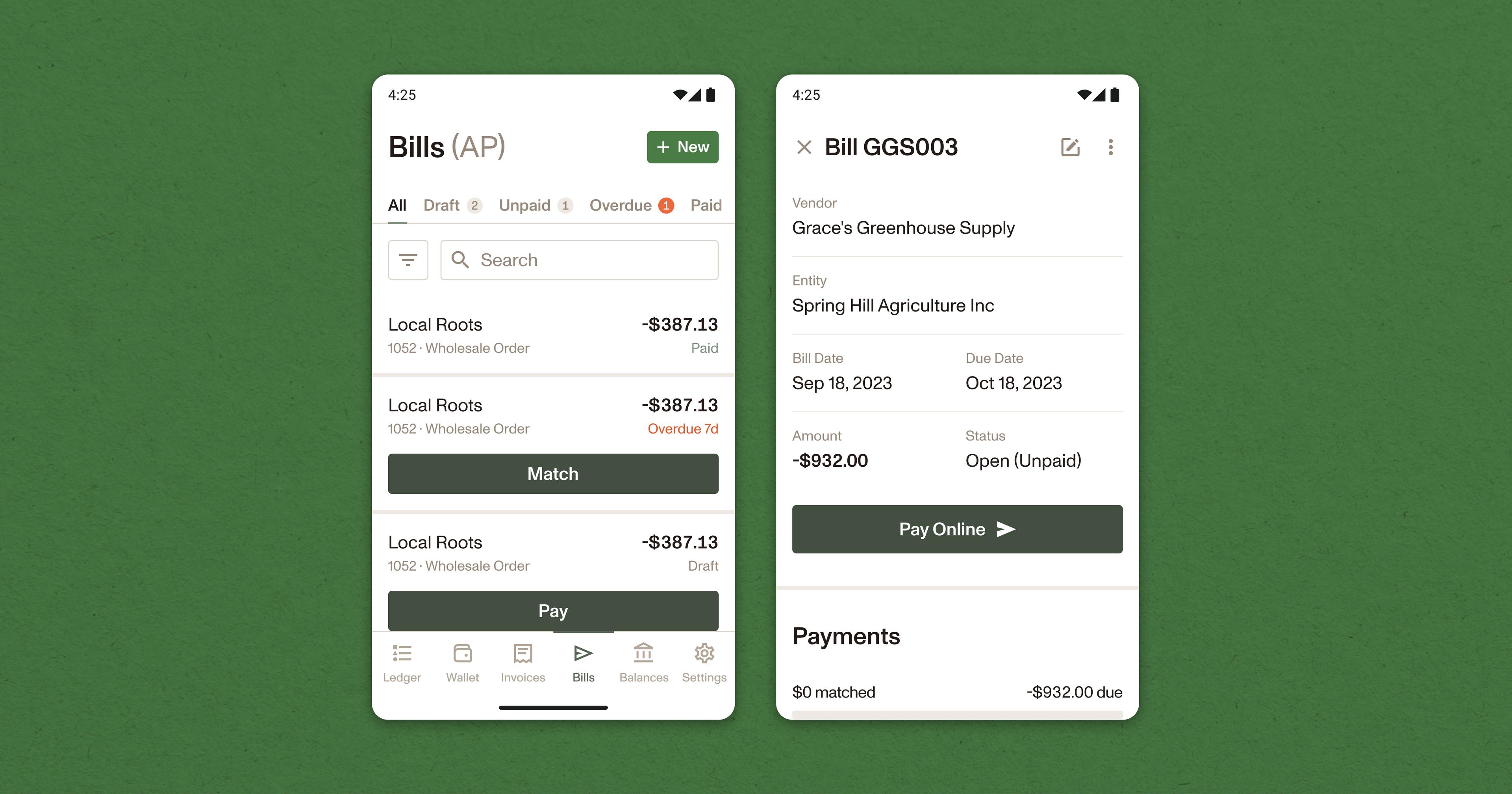
This list should be separate from the system you use to track your own outgoing invoices, and should give you a clear idea of the due date, amount, vendor information, and payment status for each outstanding bill.
Software solutions like Ambrook can be particularly powerful in this case, allowing you to filter, sort through and find outstanding bills quickly and easily.
2. Make data capture painless
Bills can be both physical and digital. Your bill payment solution should make capturing the data from either efficient and painless.
If you use a digital system for processing bills, for example, having some method of quickly importing physical bills can save you time and minimize the chances that you might forget to include it in your system.
3. Track and review payment dates often
Once you’ve entered a bill into your system, make it a habit to regularly check outstanding bill payment dates.
Ideally, your system should have some way of clearly labeling bills that are overdue and require immediate attention. Creating a bill payment calendar can also help you make sense of upcoming due dates and visualize which accounts should be prioritized.
4. Designate a bill pay day
If setting aside enough time to handle bill pay every day or week is difficult, designate a single day of the month to take care of bill payments, with an eye on payment due dates.
5. Automate as much as you can
As your business expands and bill payment becomes more complex, you might find yourself repeating many of the same tasks over and over again.
Software-based systems like Ambrook can cut down on repetitive tasks by transcribing paper bills, saving vendor information for easy manual entry, and integrating with your bookkeeping to cut down on administrative work.
6. Control your cash flow
Paying your bills on time is important, but paying them too quickly can also be less than ideal. Many businesses will adopt a “just in time” approach to bill pay as a result, carefully scheduling payments to avoid missing due dates while maximizing control over their cash flow.
Ambrook’s “just in time” payment scheduling function helps automate this process, giving users peace of mind that their bills will be paid on time without having to manually calculate bill payment dates.
7. Become payment method agnostic
Vendors often have different preferences for how to get paid, whether it’s via cash, check, ACH transfer, or credit card. Staying flexible and accommodating these preferences can help you avoid delays, avoid extra administrative work and keep your vendors happy.
How Ambrook’s bill pay software can help
While spreadsheets and physical lists can work in the short term, as businesses grow and their bill payment needs become more complex, they often turn to more sophisticated software-based solutions like Ambrook.
Ambrook can take your operation to the next level, unlocking new opportunities for collaboration, eliminating hours of repetitive administrative work with powerful automation tools, and giving you maximum control over cash flow.
1. Improve bill pay collaboration
As businesses expand, bill payment often becomes a team effort. One team member might take responsibility for administrative tasks like uploading bills into the system or bookkeeping, for example, while another might be responsible for executing the payments.
Centralizing bill payment with software makes it easier for multiple team members to contribute to bill payment this way. With Ambrook, users can share responsibility for different aspects of the bill payment workflow, improving collaboration and efficiency.
2. Save time with powerful automation tools
Ambrook uses automation to maximize flexibility, cut down on repetitive administrative work and remove friction from the bill payment management process.
With Ambrook, users can use a mobile app to scan and import paper bills in the field or onsite with a vendor. If you typically receive bills through email, you can also designate a bill forwarding address in Ambrook. The system will automatically create draft bills from your emails.
3. Maximize bill payment method flexibility
Ambrook’s payment tools give you maximum control over how you pay your bills, giving users the ability to:
Have Ambrook mail their vendor a check on their behalf
Print a check themselves via an external bank account
Pay via ACH transfer, credit card, or Ambrook card
Pay in-network via Ambrook Pay
Pay off-platform and mark the bill as paid
Pay many bills across vendors at once with bulk bill pay
You can set a default payment method for each of your vendors, so you pay the preferred way without having to think about it every time.
Bookkeeping for ACH payments, mailed check, and Ambrook Pay is also processed automatically, eliminating even more administrative work and saving users time.
How do I get started with Ambrook?
Ambrook takes your bill pay system to the next level, allowing you to track and manage your bills in one place while eliminating hours of repetitive administrative work every month with powerful automation tools.
Team members can capture and import bills in the field, batch upload multiple bills, and use powerful automation tools to save time on manual data entry and bookkeeping. Ambrook’s powerful payment tools also help businesses become payment method agnostic, allowing them to pay vendors how they’d like to be paid without the hassle.
Frequently asked questions (FAQs) about bill pay
What is bill pay?
Bill pay is the process a business uses to receive, approve, pay, and record the bills it owed suppliers and vendors. It can run on paper, a self-built spreadsheet, or software like Ambrook that helps you capture bills, schedule payments, and update the books.
What’s the difference between bill pay and accounts payable (AP)?
Accounts payable represents all the unpaid bills you owe vendors for goods and services you’ve received; it’s recorded as a liability on your balance sheet. Bill pay is your workflow for paying those bills: capturing them, actually making the payments, and recording the transactions.
How often should a small business review and pay its bills?
If you work with many vendors or have short payment terms, it might make sense to review and pay your bills every week or biweekly. Some small businesses set aside one day a month to go through their bills. The important part is reviewing due dates on a consistent schedule, so nothing is paid late.
What are “just in time” bill payments?
A “just in time” approach to paying bills usually means you’re scheduling payments to arrive on or right before their due date. Some businesses do this to maintain more control over their cash flow.
How do I set up a collaborative bill pay process?
As your operation scales, you might have multiple team members managing bill pay. One person takes care of uploading the bills into your bookkeeping system, for example, while the other is responsible for the payments themselves. Bringing your bills and bookkeeping into a centralized platform like Ambrook is one way to make this easier, so everyone can collaborate on bill pay from a shared place.